How / Why You Should Use Page Invitation Credits to Increase Your Page Followers
May 26, 2026
TLDR: Using the Page Follower Invitation feature is a quick and easy (and FREE) way to increase your brand visibility and support business growth on LinkedIn.
LinkedIn is the top site for B2B networking, and it's also a great place to create brand awareness and generate leads for your business, through your profile and your company page.
But did you know that LinkedIn has a feature that allows page admins to invite their connections to FOLLOW your company page?
I highly recommend using this feature, to help to easily grow your page followers if you're a page admin.
Here's how to Use Page Invitation Credits to Increase Your Page Followers:
- Go to your company page. If you are a page admin, you will automatically be viewing your page in admin view, and you'll see a navigation panel on the left side of your screen.
- Scroll down until you see "Invite to follow" and click this. You'll now see a pop-up box on your page, "Invite to follow." Your page likely has 50 credits available this month. I say "likely" because LinkedIn used to give page admins 250 page follower credits, and newer pages used ot get 100 page follower credits. If you've upgraded to LinkedIn Page Premium, you'll have 300 page follower credits. In each case, these are "credits" that reset each month. A "credit" means that if you invite a connection to follow your page and they accept the request and they click "FOLLOW," then you get the credit back. And you can invite MORE connections to follow your page. For this reason, I recommend focusing on people who know you and who are likely to accept and click FOLLOW when you invite them: clients, friends, family members, people you've recently met at networking events, etc.
- Invite your connections to follow your company page. You can do so by typing in and selecting their name, and then by clicking the checkbox next to their name. Alternatively, you can use one of the four filters they offer: Locations, Current company, School, or Industry.
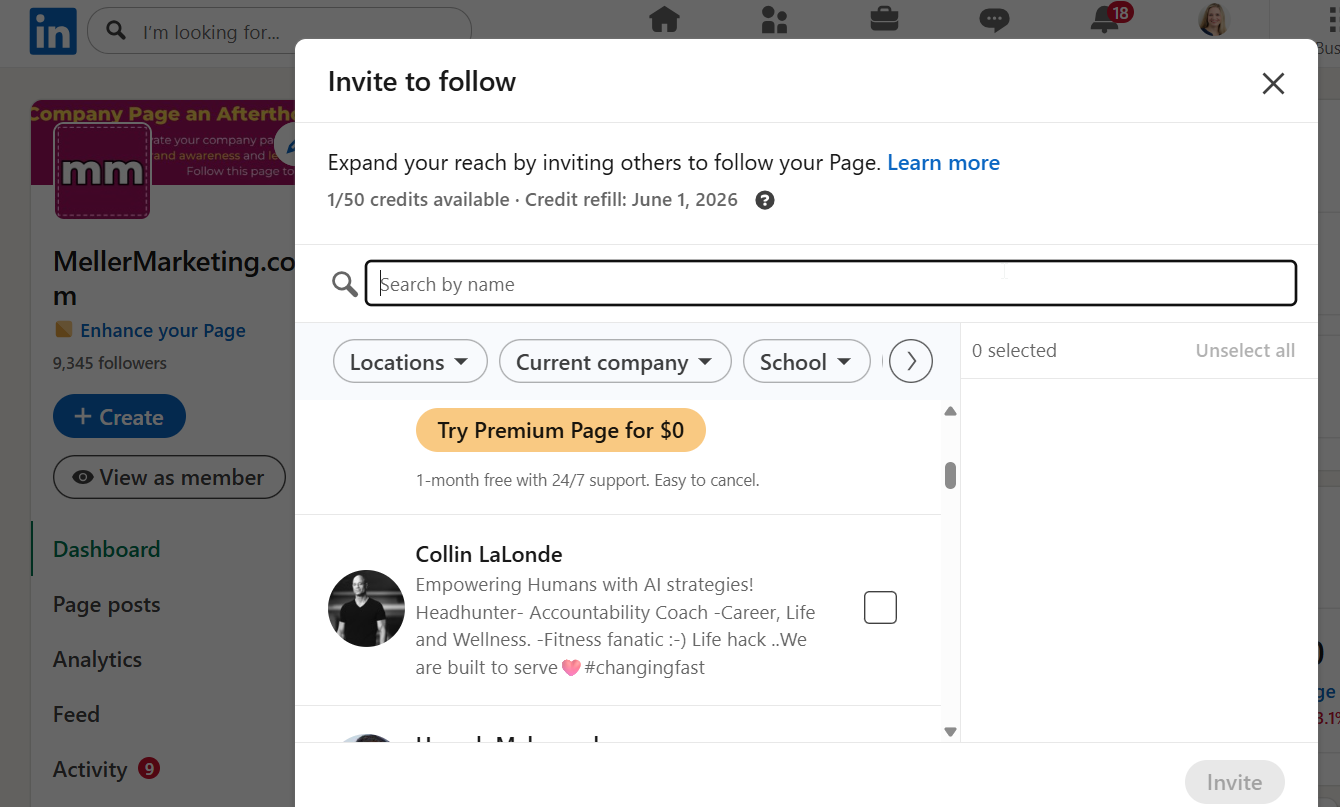
- Use all 50 page invitation credits. You either use them or lose them each month, and they reset the first day of the following month. For this reason, I usually recommend that my clients use their page follow invitation credits in the first few days of each month, and then check again in the final week of each month for any that were redeemed (and therefore you have more credits to use.
- Click on "Invite" in the lower right corner. LinkedIn will then send out the page follow invitation requests on your behalf. These will appear in their pending invitations, and look like this:

Note that it will show your name and the text "....invited you to follow..." and then your company name. The recipient can either ignore or ACCEPT. And if they Accept, you get the the page invitation credit back! :)
As a LinkedIn Marketing Consultant, I like to remind my members and clients of a few pro tips:
-
Focus on sending these to people LIKELY to accept, especially if your page has under 500 followers.
-
Followers = Supporters / Leads. People don't need to Accept. If they do, it's basically like they are raising their hand to show support of you or interest in your business.
-
Invitations to Follow Increase Page Visits. Some people might not Accept right away, but they will first click to visit your page. When they do so, they are open and receptive to your page messaging. Therefore, make sure your page has been optimized! (If you don't know what this means, I can help you. Visit this link to learn more about my LinkedIn Company Page Strategy Services: https://www.mellermarketing.com/LinkedInCompanyPageStrategy)
-
You can see WHO is following your page and these may be leads for your business!
Questions? [email protected]
