
How / Why to View LinkedIn Company Page Followers -- and What to do NEXT for Lead Generation (without being icky)
May 26, 2026
If you're using LinkedIn to grow your brand and ultimately to try to generate more business, keep reading. In this blog, I'm going to explain how (and WHY) to view your Company Page followers on LinkedIn, and what to do next (in a "non-icky" way) to support lead generation.
FIRST: How to view your Company Page followers on LinkedIn
You will only be able to see your company page followers if you're a Page Admin. Hopefully you work for a company that recognizes that salespeople need access to this information and they've made you an admin.
Or, maybe you're self-employed and you're the only admin (if so, make sure to add a family member or trusted friend to be an admin, too. Learn how and why here.)
- Go to your company page
- Click on your follower count
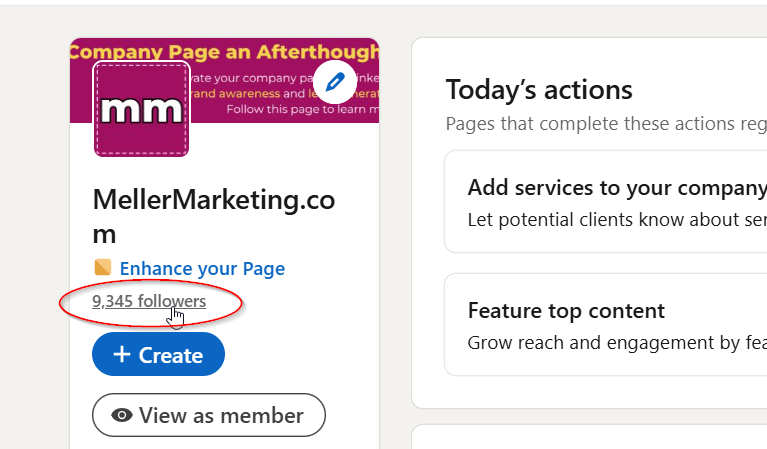
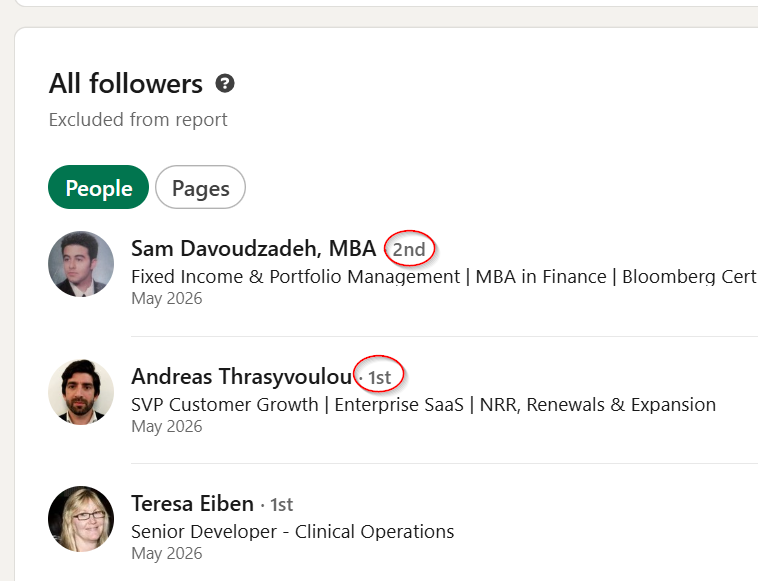
- Scroll down to the bottom and you'll see WHO is following your page. Next to their name you'll see 1st, 2nd, or 3rd+ which indicate your level of connection to the person.
NEXT: identify page follower who are prospects
- 1st level: message them and thank them for following your page. Ask how they are doing (or some low-friction, non-salesy question). The goal here is to move slowly. Imagine you saw them in person. You wouldn't pitch them right away. You'd make small talk first, right?
- 2nd or 3rd: identify who is a prospect. Some won't be prospects, so skip them. Then, invite your prospects to connect. Feel free to use my preferred invitation text:
Hi (firstname), we haven't met, but I saw you recently started following my company page. I'm the face behind Meller Marketing. Let's connect on LinkedIn. Brenda Meller
It's OK here to mention they are following your page, especially if they are a RECENT follower, because they probably will remember visiting (and perhaps clicking "FOLLOW" on your page). And if they temporarily forgot, your invitation message will remind them.
THEN: Go Slow. Follow their lead.
- 1st level: If they don't respond right away, give it a few days and comment on one of their recent posts.
- 2nd or 3rd: if they don't accept your invitation within a few days, look at their LinkedIn activity feed to see how active they are. Give them a few days or up to a week and if they are posting, comment on one of their recent posts.
- For both: commenting on their posts increases your visibility, in a supportive, "non-icky" way.
WAIT: and proceed if they show interest.
On behalf of all of us on LinkedIn, don't be "icky" and do any of these things:
- Pitchslap. That means hitting us with a sales pitch immediately after we connect, or respond to your checking in message.
- Ask for a discovery call / coffee chat if we haven't expressed ANY interest in your company / products / services yet. We might just be following your page to show our support of you.
- Add us to your email list if we connect with you. Accepting your invitation to connect isn't an email opt-in.
Find this helpful? Let me know! [email protected]
